Sketchy Gossip: The Hand-Drawn Font Built for Drawing—Not Printing
If you've ever tried to make a hand-lettered greeting card in Cricut Design Space—or engraved a custom cutting board with a Glowforge—you know the frustration of fonts that look great on screen but fail at the drawing stage. That’s where Sketchy Gossip steps in—not as another decorative display font, but as a purpose-built tool for devices that *draw*, not print.
What Is Sketchy Gossip—Really?
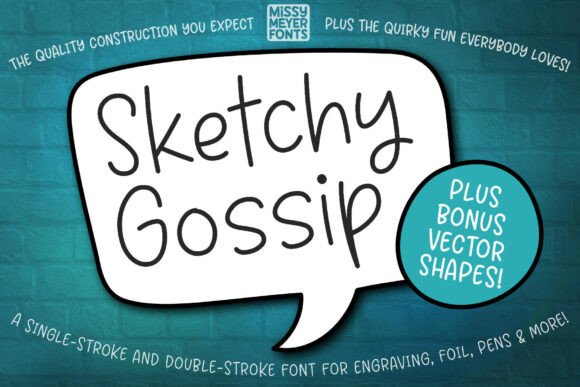
Sketchy Gossip is a playful, single-line handwriting font inspired by the beloved Juicy Gossip outline typeface—but reimagined from the ground up for precision drawing. Its rounded, relaxed strokes mimic natural pen-on-paper motion: no sharp corners, no thick-and-thin contrast, just smooth, consistent curves that flow like a confident sketch.
Crucially, it’s not designed for typing documents or web pages. You won’t use it in Word or Google Docs—and that’s intentional. Instead, Sketchy Gossip is engineered for tools that move a physical stylus, nib, or laser across a surface: sketch pens, foil quills, infusible ink pens, engraving bits, and scoring functions on machines like the Glowforge or Silhouette Cameo.
Why “Single-Line” Matters (and Why It’s Not Just a Buzzword)
Most fonts render as filled shapes—solid letters with interior space. But drawing tools don’t fill; they trace. When you send a standard font to a cutting machine or engraver, it often converts to an outline path—sometimes doubling back, sometimes creating unnecessary anchor points. The result? Jittery lines, inconsistent depth, or failed cuts.
Sketchy Gossip solves this by offering two optimized versions:
- Single-stroke: One continuous path per character—ideal for writing-style tools like foil quills, sketch pens, or hand-guided engravers.
- Double-stroke: A refined alternate that adds subtle weight variation while retaining drawability—perfect when you want expressive flair without sacrificing compatibility.
Both versions are built with clean vector geometry, minimal nodes, and predictable entry/exit points—so your machine draws smoothly, every time.
Real-World Use Cases: Where Sketchy Gossip Shines
Think beyond “just another script font.” Here’s where creators actually reach for Sketchy Gossip:
- Greeting cards & stationery: Hand-drawn charm without lifting your pen—whether you’re designing digitally or prepping for foil stamping.
- Personalized gifts: Engraved wooden spoons, leather journals, or ceramic mugs gain warmth and authenticity with its casual, human rhythm.
- Wedding signage & place cards: Couples love how Sketchy Gossip feels intimate and intentional—not generic or overly polished.
- Small business branding elements: A local bakery might use it for chalkboard-style menu headers; a boutique could apply it to custom packaging tape or gift tags.
- Educational or therapeutic tools: Teachers and therapists use it for tracing worksheets, fine-motor practice sheets, or sensory-friendly letter guides.
Bonus Assets: More Than Just Letters
With Sketchy Gossip, you also get a full SVG set of hand-drawn vector extras pulled from the original Juicy Gossip family—including:
- Banners with soft, uneven edges
- Ovals and circles drawn freehand (not perfect geometric shapes)
- Speech bubbles with tapered tails
- Decorative flourishes: stars, hearts, swirls, and connecting lines
These aren’t clipart—they’re cohesive design companions, scaled and styled to match the font’s personality. Drop them into your layout alongside Sketchy Gossip text, and everything feels like it was sketched in the same session.
Software Compatibility: What Works (and What Needs Workarounds)
Because Sketchy Gossip operates outside traditional font expectations, software behavior varies:
Cricut Design Space
You may see an error when clicking “Make It”—especially if your text contains special characters or spacing adjustments. That’s not a bug in the font; it’s how Cricut interprets non-standard paths. The included PDF guide walks you through reliable workarounds: converting text to outlines, using the SVG version, or adjusting layer settings before cutting.
Brother CanvasWorkspace
Typeable versions often won’t preview correctly due to known rendering limits. Instead, use the provided SVG files—which contain the full alphabet, numbers, and punctuation. They load instantly, scale cleanly, and retain all stroke integrity.
Glowforge, Silhouette Studio, Inkscape, Illustrator
All handle Sketchy Gossip smoothly—especially when imported as SVG or used with compatible plug-ins. For Glowforge users, selecting “Score” (not Cut) ensures crisp, shallow line work ideal for wood or acrylic.
Who Benefits Most From Sketchy Gossip?
Sketchy Gossip isn’t for everyone—and that’s okay. It shines brightest for:
- Maker-entrepreneurs who sell handmade goods and need fast, repeatable, hand-crafted-looking text.
- DIY hobbyists tired of fonts that look “too digital” on physical projects.
- Designers working across media—who need one consistent voice whether printing, engraving, or foiling.
- Educators and therapists seeking developmentally appropriate, low-frustration tracing resources.
It’s less ideal for long-form reading, accessibility-focused interfaces, or high-contrast signage where legibility trumps personality.
Practical Tips Before You Start
Before diving in, consider these real-world notes:
- Test at actual size: A letter that looks charming at 200 pt may lose clarity at 12 pt. Always preview at your final output dimensions.
- Check spacing manually: Kerning isn’t auto-adjusted like in print fonts. Use your design app’s spacing tools to fine-tune letter proximity.
- Layer thoughtfully: When combining with double-stroke text and SVG banners, group related elements to avoid accidental misalignment during export.
- Save backups in multiple formats: Keep both the original font file and SVG exports—so you’re never stuck if software updates change behavior.
Final Thought: It’s About Intention, Not Perfection
At its core, Sketchy Gossip invites a shift in mindset—from chasing pixel-perfect uniformity to embracing the quiet confidence of hand-drawn expression. It doesn’t hide imperfection; it celebrates the gesture behind the letter. Whether you're etching a name onto a baby’s first spoon or designing a limited-run art print, Sketchy Gossip helps your tools speak in a voice that feels human, warm, and unmistakably yours.
If your projects live where ink meets wood, foil meets leather, or light meets glass—Sketchy Gossip isn’t just another font. It’s the missing link between your idea and the way it lands, physically, in someone’s hands.